Buy gameover.eu ?
We are moving the project
gameover.eu .
Are you interested in purchasing the domain
gameover.eu ?
domain@kv-gmbh.de · 0541-91531010
Buy gameover.eu ?
Controller or mouse/keyboard?
The choice between using a controller or a mouse/keyboard ultimately depends on personal preference and the type of game being played. Controllers are often preferred for games that require precise analog movements, such as platformers or racing games. On the other hand, mouse/keyboard setups are typically favored for first-person shooters and real-time strategy games due to the precision and speed they offer. Some players may even use a combination of both depending on the game and their comfort level with each input method. Ultimately, the best choice is the one that feels most comfortable and natural for the individual player. **
How do I switch from console controller to PC keyboard and mouse?
To switch from using a console controller to a PC keyboard and mouse, you will need to disconnect the controller from your computer and connect a keyboard and mouse instead. If you are using a wired controller, simply unplug it from the USB port. If you are using a wireless controller, you may need to turn it off or remove its batteries. Once the controller is disconnected, you can then connect a keyboard and mouse to your computer. Your computer should automatically recognize the new input devices, and you can start using the keyboard and mouse to control your games or applications. **

Similar search terms for Black
Top-Angebote
Products related to Black:
-
CaseAndConnect PS5 PS4 Joystick Replacement Thumb Grip Caps Anti Slip Controller Covers blackUpgrade worn or slippery controller sticks with 10 pcs these PS5 PS4 joystick thumb grips designed to fit original PS5 and PS4 joysticks securely. The soft, skinfriendly surface provides a comfortable feel during extended gaming sessions. These...49,97 $*Shipping: 0,00 $Secure redirect to the provider
-
Universal Stock Analog Joystick Cover Cap Thumb Grip Replacement For XL Controller blackRestore your gaming control and enjoy a more comfortable handheld experience with this precisefit joystick cover cap. Designed for Nintendo 2DS, 3DS XL, and 3DSLL controllers, this replacement part helps refresh worn or damaged thumbsticks with...37,97 $*Shipping: 0,00 $Secure redirect to the provider
-
Everyday Crate PS5 Headset & Controller Holder Rack Foldable Side Mount Storage Hanger blackKeep your gaming setup clean, organized, and always ready for action with this sleek PS5 headset holder and controller storage solution. Designed specifically for Sony PS5 consoles, this compact sidemounted rack securely stores your headset or...34,97 $*Shipping: 0,00 $Secure redirect to the provider
-
Inspired Deals Universal VR Headset Stand With Controller Holders For Meta Quest blackKeep your VR setup clean, protected, and ready for your next adventure. This Meta Quest stand gives your headset and controllers a dedicated home while freeing your desk from distracting clutter. Designed for Meta Quest 3, Quest Pro, Oculus Quest 2,...64,97 $*Shipping: 0,00 $Secure redirect to the provider


-
'Controller or mouse and keyboard?'
The choice between using a controller or a mouse and keyboard ultimately comes down to personal preference and the type of game being played. Controllers are often preferred for games that require precise analog movements, such as racing or platformers, while mouse and keyboard are typically better for games that require quick and accurate aiming, like first-person shooters. Some players find controllers more comfortable for long gaming sessions, while others prefer the customization options and precision of a mouse and keyboard setup. Ultimately, the best choice is the one that feels most comfortable and intuitive for the individual player. **
-
Keyboard and mouse or controller?
The choice between keyboard and mouse or controller ultimately depends on personal preference and the type of game being played. Keyboard and mouse are often preferred for first-person shooters and strategy games due to their precision and quick response time. On the other hand, controllers are popular for platformers, racing games, and fighting games because of their comfort and ease of use. Some players may even use a combination of both depending on the game and their own comfort level. Ultimately, it comes down to what feels most natural and enjoyable for the individual player. **
-
Black or white keyboard?
The choice between a black or white keyboard is largely a matter of personal preference and aesthetic. Some people may prefer the sleek and modern look of a black keyboard, while others may prefer the clean and minimalist look of a white keyboard. Ultimately, the decision should be based on which color fits best with the overall design and decor of the workspace. **
-
How can you play Black Ops 4 with a mouse and keyboard?
To play Black Ops 4 with a mouse and keyboard on a console like the PlayStation 4 or Xbox One, you will need a third-party adapter like the XIM Apex. This device allows you to connect your mouse and keyboard to your console and map the controls to mimic a controller. Once you have the adapter set up, you can customize your keybindings to suit your preferences and start playing Black Ops 4 with a mouse and keyboard. Just keep in mind that using a mouse and keyboard on console may not be officially supported by the game developers and could potentially be against the terms of service. **

How can one play Black Ops 4 with a mouse and keyboard?
To play Black Ops 4 with a mouse and keyboard, you will need to connect your mouse and keyboard to your gaming console or PC. For gaming consoles such as Xbox One or PS4, you can use a third-party adapter like XIM Apex to connect your mouse and keyboard. Once connected, you can customize the key bindings and sensitivity settings in the game's options menu to suit your preferences. Keep in mind that using a mouse and keyboard on consoles may be considered unfair by some players, so it's important to be respectful of others while gaming. **
How do you connect the mouse, keyboard, and headset?
To connect the mouse, keyboard, and headset to a computer, you typically plug them into the USB ports on the computer. Most modern computers have multiple USB ports, so you can plug each device into a separate port. If your devices use Bluetooth technology, you can pair them with your computer wirelessly. Make sure to follow the manufacturer's instructions for each device to ensure they are connected properly and functioning correctly. **
Top-Angebote
Products related to Black:
-
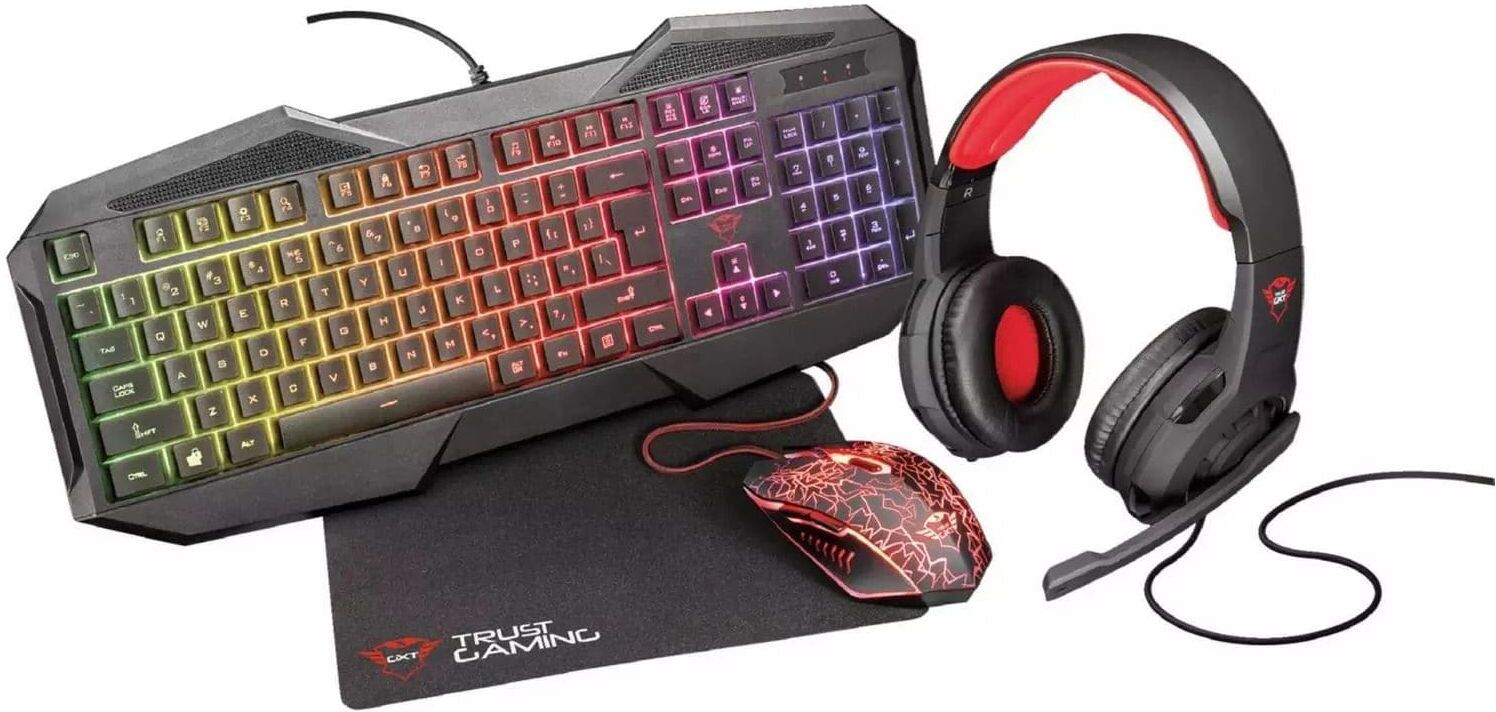
Trust GXT 788RW Keyboard Mouse Headset 4 In 1 Gaming Bundle, NewStep up your gaming setup with the Trust GXT 788RW 4-in-1 Gaming Bundle, the ultimate starter kit for every gamer seeking style, performance, and comfort — all in one box. This high-performance bundle includes a responsive gaming keyboard, precision optical mouse, immersive over-ear headset, and a durable mouse pad, all designed with a sleek gamer aesthetic and vibrant RGB lighting. Whether you're a casual player or an aspiring pro, this all-in-one kit gives you the tools you need to dominate your favorite titles right out of the box. Built for seamless compatibility with PC and gaming consoles, it’s the perfect solution for gamers looking to upgrade with value and quality. ✅ 4-in-1 Complete Gaming Kit – Includes a full-size keyboard, optical mouse, over-ear headset, and a gaming-grade mouse pad. ✅ RGB Backlit Gaming Keyboard – Enjoy dynamic multicolor lighting with anti-ghosting keys for precise and responsive control. ✅ High-Precision Gaming Mouse – Adjustable DPI settings for accurate tracking, perfect for FPS, MOBA, and RTS games. ✅ Comfortable Over-Ear Headset – Delivers powerful sound and clear communication with an adjustable headband and built-in microphone. ✅ Durable Gaming Mouse Pad – Smooth surface for optimal mouse movement and a non-slip rubber base for stability. ✅ Plug & Play Convenience – No software needed — easy USB connectivity for immediate use across platforms. ✅ Compatible with PC & Consoles – Works flawlessly with Windows PCs, laptops, and gaming consoles like PS4/PS5. ✅ Stylish & Durable Design – Rugged construction with a sharp, gamer-centric look to match your setup. ✅ Adjustable Headset Mic – Flexible boom mic ensures crisp team communication during intense gameplay. ✅ Perfect Gift for Gamers – A great choice for beginners or as a gift bundle for birthdays and holidays. The Trust GXT 788RW Gaming Bundle offers unbeatable value for gamers who want to dive right into action without compromising on quality. With everything you need to start gaming, this stylish and functional bundle is your key to immersive, competitive play. Level up your gear and dominate every session in style.25,89 £*Shipping: 0,00 £Secure redirect to the provider
-
CaseAndConnect PS5 And Xbox Series X Headset Holder And Controller Holder Console Mount 1pcKeep your gaming zone clean, organized, and ready for every session. This 1 pc compact PS5 headset holder mounts directly to a compatible PS5 or Xbox Series X console, giving your headset or controller a convenient home without taking up valuable...34,97 $*Shipping: 0,00 $Secure redirect to the provider
-
CaseAndConnect PS5 PS4 Joystick Replacement Thumb Grip Caps Anti Slip Controller Covers blackUpgrade worn or slippery controller sticks with 10 pcs these PS5 PS4 joystick thumb grips designed to fit original PS5 and PS4 joysticks securely. The soft, skinfriendly surface provides a comfortable feel during extended gaming sessions. These...49,97 $*Shipping: 0,00 $Secure redirect to the provider
-
Universal Stock Analog Joystick Cover Cap Thumb Grip Replacement For XL Controller blackRestore your gaming control and enjoy a more comfortable handheld experience with this precisefit joystick cover cap. Designed for Nintendo 2DS, 3DS XL, and 3DSLL controllers, this replacement part helps refresh worn or damaged thumbsticks with...37,97 $*Shipping: 0,00 $Secure redirect to the provider
-
Controller or mouse/keyboard?
The choice between using a controller or a mouse/keyboard ultimately depends on personal preference and the type of game being played. Controllers are often preferred for games that require precise analog movements, such as platformers or racing games. On the other hand, mouse/keyboard setups are typically favored for first-person shooters and real-time strategy games due to the precision and speed they offer. Some players may even use a combination of both depending on the game and their comfort level with each input method. Ultimately, the best choice is the one that feels most comfortable and natural for the individual player. **
-
How do I switch from console controller to PC keyboard and mouse?
To switch from using a console controller to a PC keyboard and mouse, you will need to disconnect the controller from your computer and connect a keyboard and mouse instead. If you are using a wired controller, simply unplug it from the USB port. If you are using a wireless controller, you may need to turn it off or remove its batteries. Once the controller is disconnected, you can then connect a keyboard and mouse to your computer. Your computer should automatically recognize the new input devices, and you can start using the keyboard and mouse to control your games or applications. **
-
'Controller or mouse and keyboard?'
The choice between using a controller or a mouse and keyboard ultimately comes down to personal preference and the type of game being played. Controllers are often preferred for games that require precise analog movements, such as racing or platformers, while mouse and keyboard are typically better for games that require quick and accurate aiming, like first-person shooters. Some players find controllers more comfortable for long gaming sessions, while others prefer the customization options and precision of a mouse and keyboard setup. Ultimately, the best choice is the one that feels most comfortable and intuitive for the individual player. **
-
Keyboard and mouse or controller?
The choice between keyboard and mouse or controller ultimately depends on personal preference and the type of game being played. Keyboard and mouse are often preferred for first-person shooters and strategy games due to their precision and quick response time. On the other hand, controllers are popular for platformers, racing games, and fighting games because of their comfort and ease of use. Some players may even use a combination of both depending on the game and their own comfort level. Ultimately, it comes down to what feels most natural and enjoyable for the individual player. **
Similar search terms for Black
-
Everyday Crate PS5 Headset & Controller Holder Rack Foldable Side Mount Storage Hanger blackKeep your gaming setup clean, organized, and always ready for action with this sleek PS5 headset holder and controller storage solution. Designed specifically for Sony PS5 consoles, this compact sidemounted rack securely stores your headset or...34,97 $*Shipping: 0,00 $Secure redirect to the provider
-
Inspired Deals Universal VR Headset Stand With Controller Holders For Meta Quest blackKeep your VR setup clean, protected, and ready for your next adventure. This Meta Quest stand gives your headset and controllers a dedicated home while freeing your desk from distracting clutter. Designed for Meta Quest 3, Quest Pro, Oculus Quest 2,...64,97 $*Shipping: 0,00 $Secure redirect to the provider
-
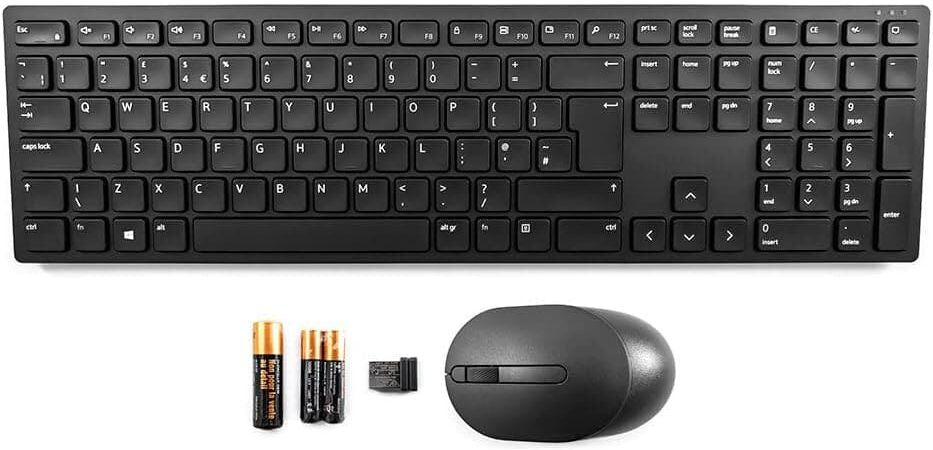
Dell Pro KM5221W Keyboard & Mouse Combo - Wireless, QWERTY UK Layout, BlackThis mini keyboard has 2.4G mode. Help you control your devices with or without bluetooth with ONE remote. Easily switch between bluetooth and 2.4GHz connection freely. Breakthrough design of wireless mini keyboard and remote! Brand Dell Colour Black Connectivity technology Wireless USB Compatible devices Personal Computer Keyboard description UK English42,00 £*Shipping: 0,00 £Secure redirect to the provider
-
Combo Retail Shop Handle Grip Accessories, Joystick Grip For Left And Right Controller blackUpgrade your gaming setup with these Handle Grip Accessories Joystick Grip, designed for both the left and right controllers. Whether you're a casual gamer or a competitive player, these grips are the perfect solution to improve your comfort and...24,97 $*Shipping: 0,00 $Secure redirect to the provider
-
Black or white keyboard?
The choice between a black or white keyboard is largely a matter of personal preference and aesthetic. Some people may prefer the sleek and modern look of a black keyboard, while others may prefer the clean and minimalist look of a white keyboard. Ultimately, the decision should be based on which color fits best with the overall design and decor of the workspace. **
-
How can you play Black Ops 4 with a mouse and keyboard?
To play Black Ops 4 with a mouse and keyboard on a console like the PlayStation 4 or Xbox One, you will need a third-party adapter like the XIM Apex. This device allows you to connect your mouse and keyboard to your console and map the controls to mimic a controller. Once you have the adapter set up, you can customize your keybindings to suit your preferences and start playing Black Ops 4 with a mouse and keyboard. Just keep in mind that using a mouse and keyboard on console may not be officially supported by the game developers and could potentially be against the terms of service. **
-
How can one play Black Ops 4 with a mouse and keyboard?
To play Black Ops 4 with a mouse and keyboard, you will need to connect your mouse and keyboard to your gaming console or PC. For gaming consoles such as Xbox One or PS4, you can use a third-party adapter like XIM Apex to connect your mouse and keyboard. Once connected, you can customize the key bindings and sensitivity settings in the game's options menu to suit your preferences. Keep in mind that using a mouse and keyboard on consoles may be considered unfair by some players, so it's important to be respectful of others while gaming. **
-
How do you connect the mouse, keyboard, and headset?
To connect the mouse, keyboard, and headset to a computer, you typically plug them into the USB ports on the computer. Most modern computers have multiple USB ports, so you can plug each device into a separate port. If your devices use Bluetooth technology, you can pair them with your computer wirelessly. Make sure to follow the manufacturer's instructions for each device to ensure they are connected properly and functioning correctly. **
* All prices are inclusive of VAT and, if applicable, plus shipping costs. The offer information is based on the details provided by the respective shop and is updated through automated processes. Real-time updates do not occur, so deviations can occur in individual cases. ** Note: Parts of this content were created by AI.