Buy gameover.eu ?
We are moving the project
gameover.eu .
Are you interested in purchasing the domain
gameover.eu ?
domain@kv-gmbh.de · 0541-91531010
Buy gameover.eu ?
How do I launch a console from a Windows Form?
To launch a console from a Windows Form in C#, you can use the `System.Diagnostics.Process` class to start a new instance of the command prompt. You can use the `Start` method of the `Process` class to start the command prompt and then interact with it using the `StandardInput` and `StandardOutput` properties. Here's an example of how you can launch a console from a Windows Form: ```csharp private void LaunchConsoleButton_Click(object sender, EventArgs e) { ProcessStartInfo startInfo = new ProcessStartInfo { FileName = "cmd.exe", RedirectStandardInput = true, RedirectStandardOutput = true, UseShellExecute = false, CreateNoWindow = true }; Process process = new Process { StartInfo = startInfo }; process.Start(); } ``` This code creates a new instance of the command prompt and starts it without displaying a window. You can then interact with **
Controller or mouse/keyboard?
The choice between using a controller or a mouse/keyboard ultimately depends on personal preference and the type of game being played. Controllers are often preferred for games that require precise analog movements, such as platformers or racing games. On the other hand, mouse/keyboard setups are typically favored for first-person shooters and real-time strategy games due to the precision and speed they offer. Some players may even use a combination of both depending on the game and their comfort level with each input method. Ultimately, the best choice is the one that feels most comfortable and natural for the individual player. **
Similar search terms for Launch
Top-Angebote
Products related to Launch:
-
CaseAndConnect PS5 And Xbox Series X Headset Holder And Controller Holder Console Mount 1pcKeep your gaming zone clean, organized, and ready for every session. This 1 pc compact PS5 headset holder mounts directly to a compatible PS5 or Xbox Series X console, giving your headset or controller a convenient home without taking up valuable...34,97 $*Shipping: 0,00 $Secure redirect to the provider
-
Florsheim Launch Wingtip Oxford Shoes - Mens 7 Brown Oxford Medium*Leather upper. Soft, comfortable Suedetec linings. Fully cushioned, removable Comfortech footbed with molded EVA and eco-friendly BLOOM algae. Durable, cushioned EVA outsole with rubber traction pods and Flexsole technology Florsheim Launch...119,95 $*Shipping: 0,00 $Secure redirect to the provider
-
Florsheim Launch Plain Toe Oxford Shoes - Mens 10 Black Oxford Medium*Florsheim Launch Plain Toe Oxford has a hybrid dress/casual style that gives it the versatility to wear to work or on the weekend. Smooth leather upper. Comfortable Suedetec linings. Removable Comfortech footbed with molded EVA and eco-friendly...83,97 $*Shipping: 0,00 $Secure redirect to the provider
-
Florsheim Launch Wingtip Oxford Shoes - Mens 10.5 Brown Oxford Medium*Leather upper. Soft, comfortable Suedetec linings. Fully cushioned, removable Comfortech footbed with molded EVA and eco-friendly BLOOM algae. Durable, cushioned EVA outsole with rubber traction pods and Flexsole technology Florsheim Launch...119,95 $*Shipping: 0,00 $Secure redirect to the provider


-
How do I switch from console controller to PC keyboard and mouse?
To switch from using a console controller to a PC keyboard and mouse, you will need to disconnect the controller from your computer and connect a keyboard and mouse instead. If you are using a wired controller, simply unplug it from the USB port. If you are using a wireless controller, you may need to turn it off or remove its batteries. Once the controller is disconnected, you can then connect a keyboard and mouse to your computer. Your computer should automatically recognize the new input devices, and you can start using the keyboard and mouse to control your games or applications. **
-
'Controller or mouse and keyboard?'
The choice between using a controller or a mouse and keyboard ultimately comes down to personal preference and the type of game being played. Controllers are often preferred for games that require precise analog movements, such as racing or platformers, while mouse and keyboard are typically better for games that require quick and accurate aiming, like first-person shooters. Some players find controllers more comfortable for long gaming sessions, while others prefer the customization options and precision of a mouse and keyboard setup. Ultimately, the best choice is the one that feels most comfortable and intuitive for the individual player. **
-
Keyboard and mouse or controller?
The choice between keyboard and mouse or controller ultimately depends on personal preference and the type of game being played. Keyboard and mouse are often preferred for first-person shooters and strategy games due to their precision and quick response time. On the other hand, controllers are popular for platformers, racing games, and fighting games because of their comfort and ease of use. Some players may even use a combination of both depending on the game and their own comfort level. Ultimately, it comes down to what feels most natural and enjoyable for the individual player. **
-
How do I activate Launch Control in Forza Horizon 5 using the keyboard?
To activate Launch Control in Forza Horizon 5 using the keyboard, you will need to first ensure that your car is equipped with the feature. Once you are in a race or free roam, press and hold the clutch button (default is 'C') and then press the throttle button (default is 'W') to activate Launch Control. This will allow you to launch your car with maximum acceleration at the start of a race or from a standstill. Keep in mind that the specific key bindings may vary depending on your personal settings. **


How does a rocket launch work?
A rocket launch works by igniting the rocket engines, which produce a powerful thrust that propels the rocket upwards. The rocket must overcome Earth's gravity and atmospheric resistance to reach space. As the rocket ascends, it sheds stages to reduce weight and increase efficiency. Once the rocket reaches the desired altitude and velocity, it releases its payload, such as a satellite, into orbit. **
Do rockets emit CO2 during launch?
Yes, rockets do emit CO2 during launch. The combustion of rocket fuel, which is typically a mixture of liquid oxygen and a hydrocarbon fuel like kerosene or hydrogen, produces carbon dioxide (CO2) as a byproduct. The amount of CO2 emitted during a rocket launch can vary depending on the type of fuel used and the size of the rocket, but it is a significant contributor to greenhouse gas emissions from the aerospace industry. Efforts are being made to develop more environmentally friendly rocket fuels to reduce the carbon footprint of space travel. **
Top-Angebote
Products related to Launch:
-
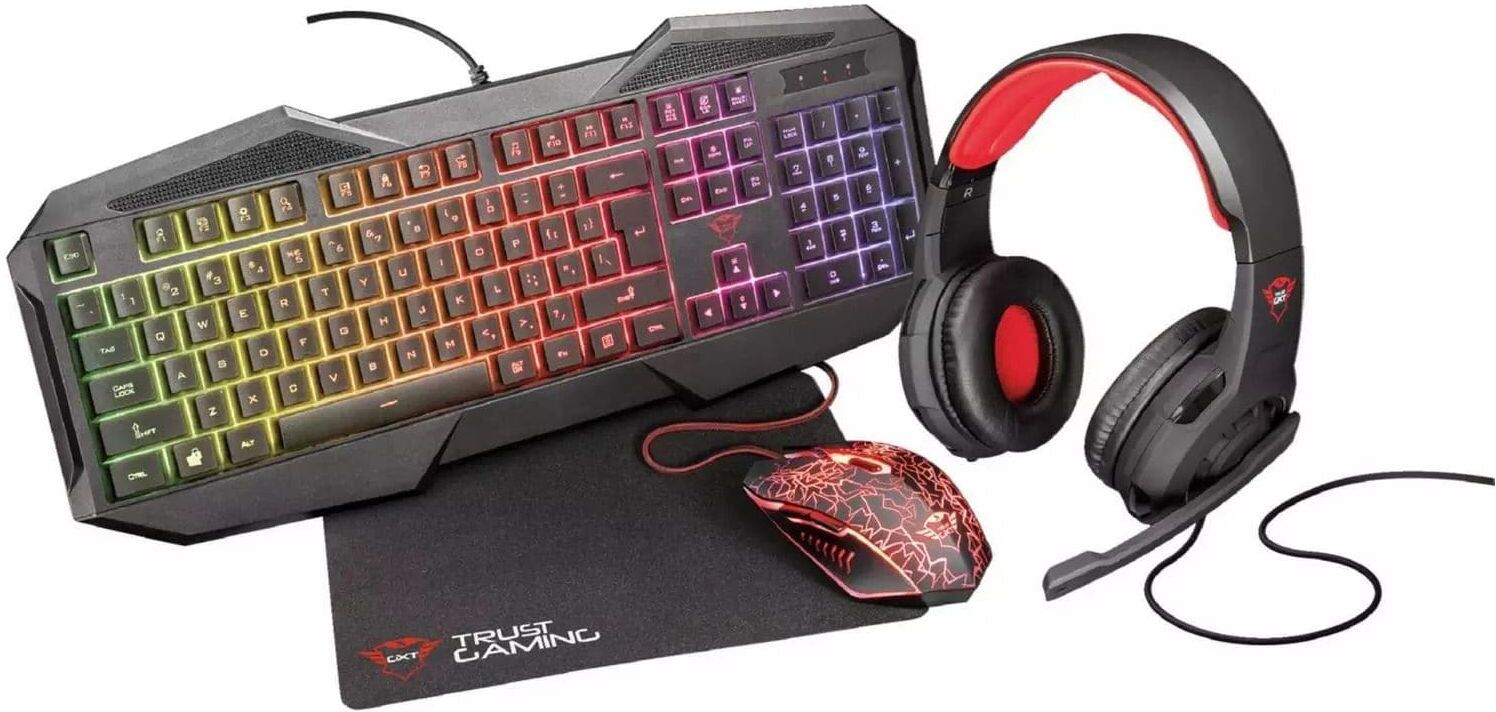
Trust GXT 788RW Keyboard Mouse Headset 4 In 1 Gaming Bundle, NewStep up your gaming setup with the Trust GXT 788RW 4-in-1 Gaming Bundle, the ultimate starter kit for every gamer seeking style, performance, and comfort — all in one box. This high-performance bundle includes a responsive gaming keyboard, precision optical mouse, immersive over-ear headset, and a durable mouse pad, all designed with a sleek gamer aesthetic and vibrant RGB lighting. Whether you're a casual player or an aspiring pro, this all-in-one kit gives you the tools you need to dominate your favorite titles right out of the box. Built for seamless compatibility with PC and gaming consoles, it’s the perfect solution for gamers looking to upgrade with value and quality. ✅ 4-in-1 Complete Gaming Kit – Includes a full-size keyboard, optical mouse, over-ear headset, and a gaming-grade mouse pad. ✅ RGB Backlit Gaming Keyboard – Enjoy dynamic multicolor lighting with anti-ghosting keys for precise and responsive control. ✅ High-Precision Gaming Mouse – Adjustable DPI settings for accurate tracking, perfect for FPS, MOBA, and RTS games. ✅ Comfortable Over-Ear Headset – Delivers powerful sound and clear communication with an adjustable headband and built-in microphone. ✅ Durable Gaming Mouse Pad – Smooth surface for optimal mouse movement and a non-slip rubber base for stability. ✅ Plug & Play Convenience – No software needed — easy USB connectivity for immediate use across platforms. ✅ Compatible with PC & Consoles – Works flawlessly with Windows PCs, laptops, and gaming consoles like PS4/PS5. ✅ Stylish & Durable Design – Rugged construction with a sharp, gamer-centric look to match your setup. ✅ Adjustable Headset Mic – Flexible boom mic ensures crisp team communication during intense gameplay. ✅ Perfect Gift for Gamers – A great choice for beginners or as a gift bundle for birthdays and holidays. The Trust GXT 788RW Gaming Bundle offers unbeatable value for gamers who want to dive right into action without compromising on quality. With everything you need to start gaming, this stylish and functional bundle is your key to immersive, competitive play. Level up your gear and dominate every session in style.25,89 £*Shipping: 0,00 £Secure redirect to the provider
-
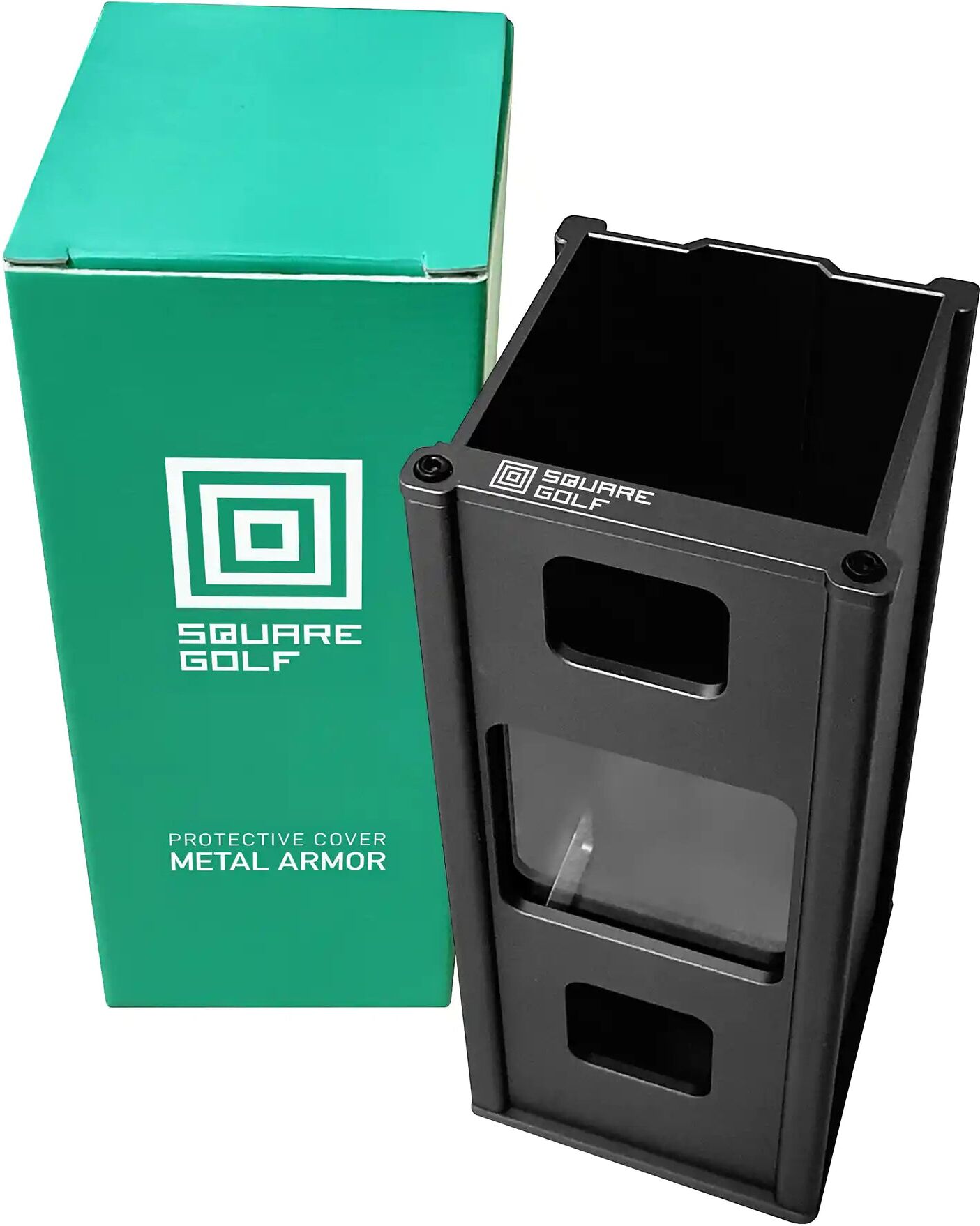
Square Golf Home Launch Monitor Protective Metal Case.gadcet-pdp{--g-green:#00a651;color:#1f2430;line-height:1.55;font-size:inherit;max-width:760px}.gadcet-pdp>*:first-child{margin-top:0}.gadcet-pdp p{margin:0 0.9em}.gadcet-pdp h3{font-size:1.05em;font-weight:600;color:#11161f;margin:1.4em 0.5em;padding-left:.5em;border-left:3px solid var(--g-green);border-radius:0;line-height:1.3}.gadcet-pdp ul{list-style:none!important;margin:0 0.9em;padding:0!important}.gadcet-pdp ul li{position:relative;padding:.1em 0.1em 1.5em;margin:0}.gadcet-pdp ul li::before{content:"";position:absolute;left:.16em;top:.45em;width:.36em;height:.66em;border:solid var(--g-green);border-width:0.14em.14em 0;transform:rotate(45deg)}.gadcet-pdp table{width:100%;border-collapse:collapse;margin:.3em 0 1em;font-size:.95em;border:1px solid #e7e9ee!important;border-radius:8px;overflow:hidden}.gadcet-pdp table td{padding:.5em.8em;border-bottom:1px solid #eef0f4!important;vertical-align:top}.gadcet-pdp table tr:last-child td{border-bottom:0!important}.gadcet-pdp table tr:nth-child(even){background:#f7f9f8}.gadcet-pdp table td:first-child{font-weight:600;color:#454c59;width:40%}@media (max-width:600px){.gadcet-pdp table td:first-child{width:42%}} Keep your Square Golf Home Launch Monitor safe from stray shots with this precision-engineered protective metal case. Designed for a secure fit and clear sensor visibility, it absorbs impact and lets you practise with total confidence. Key Features Heavy-duty metal housing built to absorb and deflect impact Officially designed by Square Golf for a precision fit with the Home Launch Monitor Shields the front, sides, rear and bottom while keeping controls accessible Clear sensor visibility for accurate ball and club tracking Passive accessory – no batteries, cables or setup required Benefits Protect your launch monitor from costly mishit damage Practise with confidence, especially with less experienced golfers Integrates neatly into your home simulator setup without clutter Maintains the clean Square Golf aesthetic in your practice space Simple, non-electronic solution for daily use Specifications Compatibility Square Golf Home Launch Monitor Material Heavy-duty metal Coverage Front, sides, rear and bottom Controls Access Top remains open for device operation What You'll Receive This listing includes one Square Golf Home Protective Metal Case in new condition. No additional accessories are included unless explicitly stated. Ideal For Perfect for golfers building a home simulator or indoor practice area who want to protect their launch monitor from accidental strikes. It's also ideal for coaching environments or family setups where mishits are more likely.89,00 £*Shipping: 0,00 £Secure redirect to the provider
-
CaseAndConnect PS5 And Xbox Series X Headset Holder And Controller Holder Console Mount 1pcKeep your gaming zone clean, organized, and ready for every session. This 1 pc compact PS5 headset holder mounts directly to a compatible PS5 or Xbox Series X console, giving your headset or controller a convenient home without taking up valuable...34,97 $*Shipping: 0,00 $Secure redirect to the provider
-
Florsheim Launch Wingtip Oxford Shoes - Mens 7 Brown Oxford Medium*Leather upper. Soft, comfortable Suedetec linings. Fully cushioned, removable Comfortech footbed with molded EVA and eco-friendly BLOOM algae. Durable, cushioned EVA outsole with rubber traction pods and Flexsole technology Florsheim Launch...119,95 $*Shipping: 0,00 $Secure redirect to the provider
-
How do I launch a console from a Windows Form?
To launch a console from a Windows Form in C#, you can use the `System.Diagnostics.Process` class to start a new instance of the command prompt. You can use the `Start` method of the `Process` class to start the command prompt and then interact with it using the `StandardInput` and `StandardOutput` properties. Here's an example of how you can launch a console from a Windows Form: ```csharp private void LaunchConsoleButton_Click(object sender, EventArgs e) { ProcessStartInfo startInfo = new ProcessStartInfo { FileName = "cmd.exe", RedirectStandardInput = true, RedirectStandardOutput = true, UseShellExecute = false, CreateNoWindow = true }; Process process = new Process { StartInfo = startInfo }; process.Start(); } ``` This code creates a new instance of the command prompt and starts it without displaying a window. You can then interact with **
-
Controller or mouse/keyboard?
The choice between using a controller or a mouse/keyboard ultimately depends on personal preference and the type of game being played. Controllers are often preferred for games that require precise analog movements, such as platformers or racing games. On the other hand, mouse/keyboard setups are typically favored for first-person shooters and real-time strategy games due to the precision and speed they offer. Some players may even use a combination of both depending on the game and their comfort level with each input method. Ultimately, the best choice is the one that feels most comfortable and natural for the individual player. **
-
How do I switch from console controller to PC keyboard and mouse?
To switch from using a console controller to a PC keyboard and mouse, you will need to disconnect the controller from your computer and connect a keyboard and mouse instead. If you are using a wired controller, simply unplug it from the USB port. If you are using a wireless controller, you may need to turn it off or remove its batteries. Once the controller is disconnected, you can then connect a keyboard and mouse to your computer. Your computer should automatically recognize the new input devices, and you can start using the keyboard and mouse to control your games or applications. **
-
'Controller or mouse and keyboard?'
The choice between using a controller or a mouse and keyboard ultimately comes down to personal preference and the type of game being played. Controllers are often preferred for games that require precise analog movements, such as racing or platformers, while mouse and keyboard are typically better for games that require quick and accurate aiming, like first-person shooters. Some players find controllers more comfortable for long gaming sessions, while others prefer the customization options and precision of a mouse and keyboard setup. Ultimately, the best choice is the one that feels most comfortable and intuitive for the individual player. **
Similar search terms for Launch
-
Florsheim Launch Plain Toe Oxford Shoes - Mens 10 Black Oxford Medium*Florsheim Launch Plain Toe Oxford has a hybrid dress/casual style that gives it the versatility to wear to work or on the weekend. Smooth leather upper. Comfortable Suedetec linings. Removable Comfortech footbed with molded EVA and eco-friendly...83,97 $*Shipping: 0,00 $Secure redirect to the provider
-
Florsheim Launch Wingtip Oxford Shoes - Mens 10.5 Brown Oxford Medium*Leather upper. Soft, comfortable Suedetec linings. Fully cushioned, removable Comfortech footbed with molded EVA and eco-friendly BLOOM algae. Durable, cushioned EVA outsole with rubber traction pods and Flexsole technology Florsheim Launch...119,95 $*Shipping: 0,00 $Secure redirect to the provider
-
Florsheim Launch Wingtip Oxford Shoes - Mens 10 Black Oxford Medium*Leather upper. Soft, comfortable Suedetec linings. Fully cushioned, removable Comfortech footbed with molded EVA and eco-friendly BLOOM algae. Durable, cushioned EVA outsole with rubber traction pods and Flexsole technology Florsheim Launch...119,95 $*Shipping: 0,00 $Secure redirect to the provider
-
Florsheim Launch Wingtip Oxford Shoes - Mens 8 Brown Oxford Medium*Leather upper. Soft, comfortable Suedetec linings. Fully cushioned, removable Comfortech footbed with molded EVA and eco-friendly BLOOM algae. Durable, cushioned EVA outsole with rubber traction pods and Flexsole technology Florsheim Launch...119,95 $*Shipping: 0,00 $Secure redirect to the provider
-
Keyboard and mouse or controller?
The choice between keyboard and mouse or controller ultimately depends on personal preference and the type of game being played. Keyboard and mouse are often preferred for first-person shooters and strategy games due to their precision and quick response time. On the other hand, controllers are popular for platformers, racing games, and fighting games because of their comfort and ease of use. Some players may even use a combination of both depending on the game and their own comfort level. Ultimately, it comes down to what feels most natural and enjoyable for the individual player. **
-
How do I activate Launch Control in Forza Horizon 5 using the keyboard?
To activate Launch Control in Forza Horizon 5 using the keyboard, you will need to first ensure that your car is equipped with the feature. Once you are in a race or free roam, press and hold the clutch button (default is 'C') and then press the throttle button (default is 'W') to activate Launch Control. This will allow you to launch your car with maximum acceleration at the start of a race or from a standstill. Keep in mind that the specific key bindings may vary depending on your personal settings. **
-
How does a rocket launch work?
A rocket launch works by igniting the rocket engines, which produce a powerful thrust that propels the rocket upwards. The rocket must overcome Earth's gravity and atmospheric resistance to reach space. As the rocket ascends, it sheds stages to reduce weight and increase efficiency. Once the rocket reaches the desired altitude and velocity, it releases its payload, such as a satellite, into orbit. **
-
Do rockets emit CO2 during launch?
Yes, rockets do emit CO2 during launch. The combustion of rocket fuel, which is typically a mixture of liquid oxygen and a hydrocarbon fuel like kerosene or hydrogen, produces carbon dioxide (CO2) as a byproduct. The amount of CO2 emitted during a rocket launch can vary depending on the type of fuel used and the size of the rocket, but it is a significant contributor to greenhouse gas emissions from the aerospace industry. Efforts are being made to develop more environmentally friendly rocket fuels to reduce the carbon footprint of space travel. **
* All prices are inclusive of VAT and, if applicable, plus shipping costs. The offer information is based on the details provided by the respective shop and is updated through automated processes. Real-time updates do not occur, so deviations can occur in individual cases. ** Note: Parts of this content were created by AI.