Buy gameover.eu ?
We are moving the project
gameover.eu .
Are you interested in purchasing the domain
gameover.eu ?
domain@kv-gmbh.de · 0541-91531010
Buy gameover.eu ?
Controller or mouse/keyboard?
The choice between using a controller or a mouse/keyboard ultimately depends on personal preference and the type of game being played. Controllers are often preferred for games that require precise analog movements, such as platformers or racing games. On the other hand, mouse/keyboard setups are typically favored for first-person shooters and real-time strategy games due to the precision and speed they offer. Some players may even use a combination of both depending on the game and their comfort level with each input method. Ultimately, the best choice is the one that feels most comfortable and natural for the individual player. **
How do I switch from console controller to PC keyboard and mouse?
To switch from using a console controller to a PC keyboard and mouse, you will need to disconnect the controller from your computer and connect a keyboard and mouse instead. If you are using a wired controller, simply unplug it from the USB port. If you are using a wireless controller, you may need to turn it off or remove its batteries. Once the controller is disconnected, you can then connect a keyboard and mouse to your computer. Your computer should automatically recognize the new input devices, and you can start using the keyboard and mouse to control your games or applications. **

Similar search terms for Adhesive
Top-Angebote
Products related to Adhesive:
-
United PS5 Controller Holder And Xbox Series X Controller Stand Gaming Headset Hanger Organizer 2pcsKeep your gaming space neat and always ready for action with this PS5 controller holder designed for modern gamers. Compatible with PS5 and Xbox Series X consoles, it provides a convenient place to store your controller, headset, and small gaming...34,97 $*Shipping: 0,00 $Secure redirect to the provider
-
Inspire Essentials Xbox Controller Replacement Thumbsticks Anti Slip Joystick Caps cBring worn controller sticks back to a more comfortable and controlled feel without replacing the entire controller. These Xbox controller replacement thumbsticks are designed to replace worn or damaged mushroom head joystick parts. The textured...45,00 $*Shipping: 0,00 $Secure redirect to the provider
-
Inspire Picks RGB Controller & Headset Stand 7 Mode Gaming Organizer With USB & Type C RGB Controller & Headset Stand 7 Mode Gaming Organizer With USB & Type CGive your gaming station a cleaner, more vibrant setup with this multifunctional RGB controller holder. Designed for compatible PS5, PS4, Xbox, and Switch Pro controllers, it combines gamepad storage with a dedicated headphone stand. Seven RGB light...117,96 $*Shipping: 0,00 $Secure redirect to the provider
-
Uplift Picks PS5 Wall Mount Kit With RGB Dual Controller Charging And Headset Hanger PS5 Wall Mount Kit With RGB Dual Controller Charging And Headset HangerCreate a cleaner gaming setup with this PS5 wall mount kit designed to hold your console, controllers, and headset in one organized space. Compatible versions support PS5, PS5 Slim, and PS5 Pro consoles, including Disc and Digital editions. The...191,49 $*Shipping: 0,00 $Secure redirect to the provider


-
'Controller or mouse and keyboard?'
The choice between using a controller or a mouse and keyboard ultimately comes down to personal preference and the type of game being played. Controllers are often preferred for games that require precise analog movements, such as racing or platformers, while mouse and keyboard are typically better for games that require quick and accurate aiming, like first-person shooters. Some players find controllers more comfortable for long gaming sessions, while others prefer the customization options and precision of a mouse and keyboard setup. Ultimately, the best choice is the one that feels most comfortable and intuitive for the individual player. **
-
Keyboard and mouse or controller?
The choice between keyboard and mouse or controller ultimately depends on personal preference and the type of game being played. Keyboard and mouse are often preferred for first-person shooters and strategy games due to their precision and quick response time. On the other hand, controllers are popular for platformers, racing games, and fighting games because of their comfort and ease of use. Some players may even use a combination of both depending on the game and their own comfort level. Ultimately, it comes down to what feels most natural and enjoyable for the individual player. **
-
What adhesive is used for climate adhesive?
Climate adhesive typically refers to an adhesive that is specifically designed to withstand extreme temperature variations and harsh weather conditions. The adhesive used for climate adhesive is often a high-performance, weather-resistant adhesive that can maintain its bond strength and durability in both hot and cold environments. These adhesives are commonly made with specialized polymers and additives to ensure they can withstand the challenges of climate variations. Examples of adhesives used for climate adhesive include polyurethane adhesives, silicone adhesives, and epoxy adhesives. **
-
Was contact adhesive used instead of Styrofoam adhesive?
No, contact adhesive was not used instead of Styrofoam adhesive. The instructions clearly stated to use Styrofoam adhesive for the project. Contact adhesive is a different type of adhesive that is not suitable for bonding Styrofoam. It is important to always follow the recommended materials and instructions to ensure the best results for any project. **


How can one apply tile adhesive on carpet adhesive?
To apply tile adhesive on carpet adhesive, first, make sure the carpet adhesive is clean and free of any debris. Then, use a trowel to spread the tile adhesive over the carpet adhesive in a thin, even layer. Press the tiles firmly into the adhesive, making sure they are properly aligned. Allow the adhesive to dry according to the manufacturer's instructions before grouting the tiles. **
How can one remove adhesive residue from adhesive tape?
One can remove adhesive residue from adhesive tape by using common household items such as rubbing alcohol, vinegar, or cooking oil. Simply apply the chosen substance to the residue and let it sit for a few minutes to loosen the adhesive. Then, gently scrub the area with a cloth or sponge until the residue is removed. Repeat the process if necessary until the surface is clean. **
Top-Angebote
Products related to Adhesive:
-
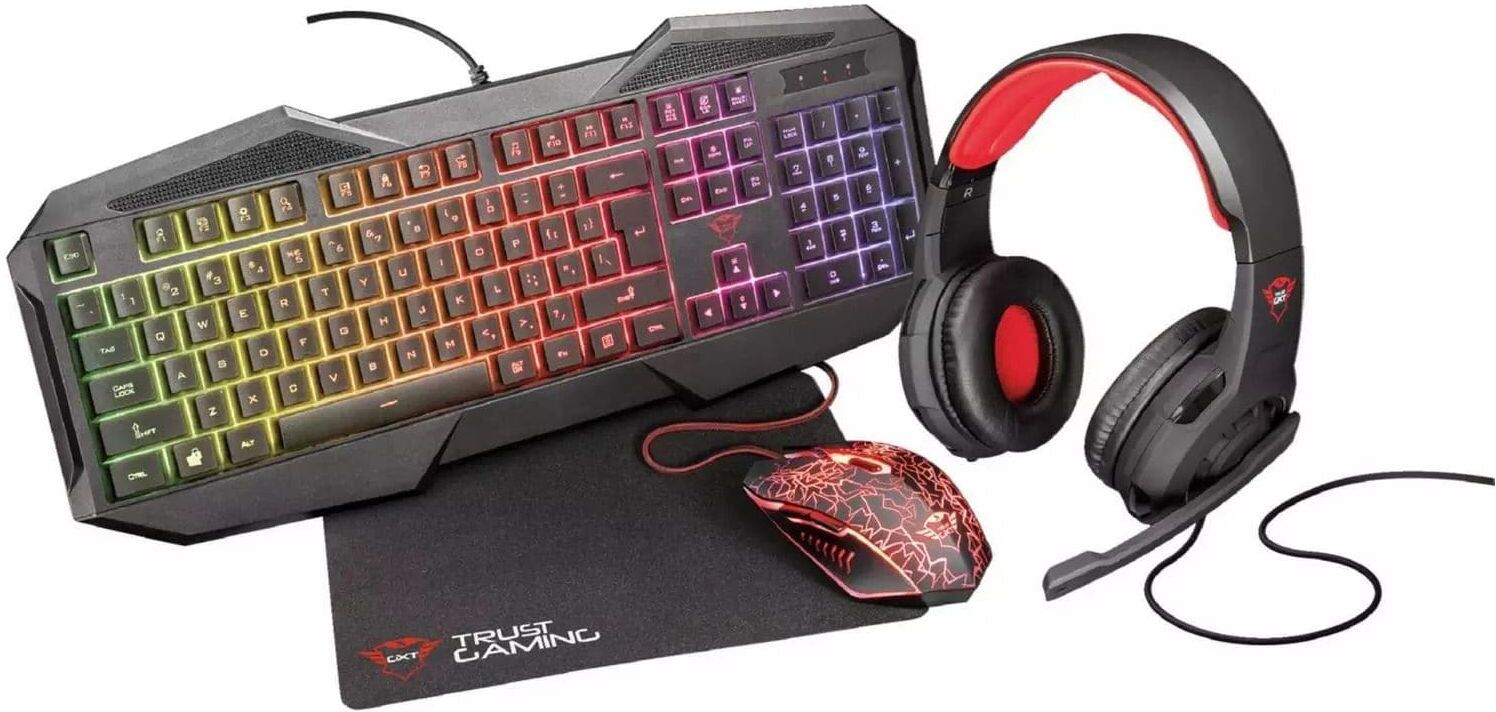
Trust GXT 788RW Keyboard Mouse Headset 4 In 1 Gaming Bundle, NewStep up your gaming setup with the Trust GXT 788RW 4-in-1 Gaming Bundle, the ultimate starter kit for every gamer seeking style, performance, and comfort — all in one box. This high-performance bundle includes a responsive gaming keyboard, precision optical mouse, immersive over-ear headset, and a durable mouse pad, all designed with a sleek gamer aesthetic and vibrant RGB lighting. Whether you're a casual player or an aspiring pro, this all-in-one kit gives you the tools you need to dominate your favorite titles right out of the box. Built for seamless compatibility with PC and gaming consoles, it’s the perfect solution for gamers looking to upgrade with value and quality. ✅ 4-in-1 Complete Gaming Kit – Includes a full-size keyboard, optical mouse, over-ear headset, and a gaming-grade mouse pad. ✅ RGB Backlit Gaming Keyboard – Enjoy dynamic multicolor lighting with anti-ghosting keys for precise and responsive control. ✅ High-Precision Gaming Mouse – Adjustable DPI settings for accurate tracking, perfect for FPS, MOBA, and RTS games. ✅ Comfortable Over-Ear Headset – Delivers powerful sound and clear communication with an adjustable headband and built-in microphone. ✅ Durable Gaming Mouse Pad – Smooth surface for optimal mouse movement and a non-slip rubber base for stability. ✅ Plug & Play Convenience – No software needed — easy USB connectivity for immediate use across platforms. ✅ Compatible with PC & Consoles – Works flawlessly with Windows PCs, laptops, and gaming consoles like PS4/PS5. ✅ Stylish & Durable Design – Rugged construction with a sharp, gamer-centric look to match your setup. ✅ Adjustable Headset Mic – Flexible boom mic ensures crisp team communication during intense gameplay. ✅ Perfect Gift for Gamers – A great choice for beginners or as a gift bundle for birthdays and holidays. The Trust GXT 788RW Gaming Bundle offers unbeatable value for gamers who want to dive right into action without compromising on quality. With everything you need to start gaming, this stylish and functional bundle is your key to immersive, competitive play. Level up your gear and dominate every session in style.25,89 £*Shipping: 0,00 £Secure redirect to the provider
-
CaseAndConnect PS5 And Xbox Series X Headset Holder And Controller Holder Console Mount 1pcKeep your gaming zone clean, organized, and ready for every session. This 1 pc compact PS5 headset holder mounts directly to a compatible PS5 or Xbox Series X console, giving your headset or controller a convenient home without taking up valuable...34,97 $*Shipping: 0,00 $Secure redirect to the provider
-
United PS5 Controller Holder And Xbox Series X Controller Stand Gaming Headset Hanger Organizer 2pcsKeep your gaming space neat and always ready for action with this PS5 controller holder designed for modern gamers. Compatible with PS5 and Xbox Series X consoles, it provides a convenient place to store your controller, headset, and small gaming...34,97 $*Shipping: 0,00 $Secure redirect to the provider
-
Inspire Essentials Xbox Controller Replacement Thumbsticks Anti Slip Joystick Caps cBring worn controller sticks back to a more comfortable and controlled feel without replacing the entire controller. These Xbox controller replacement thumbsticks are designed to replace worn or damaged mushroom head joystick parts. The textured...45,00 $*Shipping: 0,00 $Secure redirect to the provider
-
Controller or mouse/keyboard?
The choice between using a controller or a mouse/keyboard ultimately depends on personal preference and the type of game being played. Controllers are often preferred for games that require precise analog movements, such as platformers or racing games. On the other hand, mouse/keyboard setups are typically favored for first-person shooters and real-time strategy games due to the precision and speed they offer. Some players may even use a combination of both depending on the game and their comfort level with each input method. Ultimately, the best choice is the one that feels most comfortable and natural for the individual player. **
-
How do I switch from console controller to PC keyboard and mouse?
To switch from using a console controller to a PC keyboard and mouse, you will need to disconnect the controller from your computer and connect a keyboard and mouse instead. If you are using a wired controller, simply unplug it from the USB port. If you are using a wireless controller, you may need to turn it off or remove its batteries. Once the controller is disconnected, you can then connect a keyboard and mouse to your computer. Your computer should automatically recognize the new input devices, and you can start using the keyboard and mouse to control your games or applications. **
-
'Controller or mouse and keyboard?'
The choice between using a controller or a mouse and keyboard ultimately comes down to personal preference and the type of game being played. Controllers are often preferred for games that require precise analog movements, such as racing or platformers, while mouse and keyboard are typically better for games that require quick and accurate aiming, like first-person shooters. Some players find controllers more comfortable for long gaming sessions, while others prefer the customization options and precision of a mouse and keyboard setup. Ultimately, the best choice is the one that feels most comfortable and intuitive for the individual player. **
-
Keyboard and mouse or controller?
The choice between keyboard and mouse or controller ultimately depends on personal preference and the type of game being played. Keyboard and mouse are often preferred for first-person shooters and strategy games due to their precision and quick response time. On the other hand, controllers are popular for platformers, racing games, and fighting games because of their comfort and ease of use. Some players may even use a combination of both depending on the game and their own comfort level. Ultimately, it comes down to what feels most natural and enjoyable for the individual player. **
Similar search terms for Adhesive
-
Inspire Picks RGB Controller & Headset Stand 7 Mode Gaming Organizer With USB & Type C RGB Controller & Headset Stand 7 Mode Gaming Organizer With USB & Type CGive your gaming station a cleaner, more vibrant setup with this multifunctional RGB controller holder. Designed for compatible PS5, PS4, Xbox, and Switch Pro controllers, it combines gamepad storage with a dedicated headphone stand. Seven RGB light...117,96 $*Shipping: 0,00 $Secure redirect to the provider
-
Uplift Picks PS5 Wall Mount Kit With RGB Dual Controller Charging And Headset Hanger PS5 Wall Mount Kit With RGB Dual Controller Charging And Headset HangerCreate a cleaner gaming setup with this PS5 wall mount kit designed to hold your console, controllers, and headset in one organized space. Compatible versions support PS5, PS5 Slim, and PS5 Pro consoles, including Disc and Digital editions. The...191,49 $*Shipping: 0,00 $Secure redirect to the provider
-
United Multi Function Gaming Stand With RGB Light Headset Holder And Controller Charging Station Multi Function Gaming Stand With RGB Light Headset Holder And Controller Charging StationTransform your gaming area into a cleaner and more organized setup with this stylish gaming controller stand designed for gamers who want convenience and style in one place. This multifunction stand holds a headset and up to four controllers while...79,97 $*Shipping: 0,00 $Secure redirect to the provider
-
Logitech Pebble 2 MK380 Wireless Keyboard & Mouse Set - OffwhiteOverview The Logitech Pebble 2 MK380 Wireless Keyboard & Mouse Set is designed for modern, flexible working. With a slim, lightweight profile and ultra-quiet operation, it’s perfect for home, office, or on-the-go use. Reliable wireless connectivity and long battery life ensure a clutter-free, productive setup, while the minimalist off-white finish adds a clean, stylish touch to any workspace. Key Features Wireless Keyboard & Mouse Combo – Seamless, clutter-free desk setup Slim & Lightweight Design – Easy to carry and ideal for compact workspaces Quiet Typing & Clicking – Reduced noise for focused work environments Comfortable Typing Experience – Low-profile keys for smooth, natural typing High-Precision Mouse – Accurate tracking for everyday productivity Reliable Wireless Connectivity – Stable connection with compatible devices Long Battery Life – Designed for extended use without frequent battery changes Off-White Finish – Minimalist, modern aesthetic Benefits Enhances productivity with a quiet, distraction-free typing experience Saves desk space thanks to its slim, compact design Ideal for working in shared spaces or on the move Reduces cable clutter for a cleaner setup Comfortable for long typing and browsing sessions Stylish design complements modern devices and interiors Specifications Table Specification Details Model Logitech Pebble 2 MK380 Product Type Wireless Keyboard & Mouse Set Connectivity Wireless Keyboard Type Low-profile, quiet keys Mouse Type Compact wireless mouse Noise Level Quiet typing & clicking Battery Life Long-lasting (keyboard & mouse) Compatibility Windows, macOS, ChromeOS, iPadOS, Android Colour Off-White Use Type Home, Office, Travel49,00 £*Shipping: 0,00 £Secure redirect to the provider
-
What adhesive is used for climate adhesive?
Climate adhesive typically refers to an adhesive that is specifically designed to withstand extreme temperature variations and harsh weather conditions. The adhesive used for climate adhesive is often a high-performance, weather-resistant adhesive that can maintain its bond strength and durability in both hot and cold environments. These adhesives are commonly made with specialized polymers and additives to ensure they can withstand the challenges of climate variations. Examples of adhesives used for climate adhesive include polyurethane adhesives, silicone adhesives, and epoxy adhesives. **
-
Was contact adhesive used instead of Styrofoam adhesive?
No, contact adhesive was not used instead of Styrofoam adhesive. The instructions clearly stated to use Styrofoam adhesive for the project. Contact adhesive is a different type of adhesive that is not suitable for bonding Styrofoam. It is important to always follow the recommended materials and instructions to ensure the best results for any project. **
-
How can one apply tile adhesive on carpet adhesive?
To apply tile adhesive on carpet adhesive, first, make sure the carpet adhesive is clean and free of any debris. Then, use a trowel to spread the tile adhesive over the carpet adhesive in a thin, even layer. Press the tiles firmly into the adhesive, making sure they are properly aligned. Allow the adhesive to dry according to the manufacturer's instructions before grouting the tiles. **
-
How can one remove adhesive residue from adhesive tape?
One can remove adhesive residue from adhesive tape by using common household items such as rubbing alcohol, vinegar, or cooking oil. Simply apply the chosen substance to the residue and let it sit for a few minutes to loosen the adhesive. Then, gently scrub the area with a cloth or sponge until the residue is removed. Repeat the process if necessary until the surface is clean. **
* All prices are inclusive of VAT and, if applicable, plus shipping costs. The offer information is based on the details provided by the respective shop and is updated through automated processes. Real-time updates do not occur, so deviations can occur in individual cases. ** Note: Parts of this content were created by AI.